YMSL emblem — cleaned cutout
Right-click any file below to save it.
Before and after, on the two backgrounds that matter
 Original · cleaned — dark
 Original · cleaned — paper
The alpha channel itself
 Original
 Cleaned
The bottom rim at 4×, on a checkerboard
Original left, cleaned right. The grey squares are transparency.
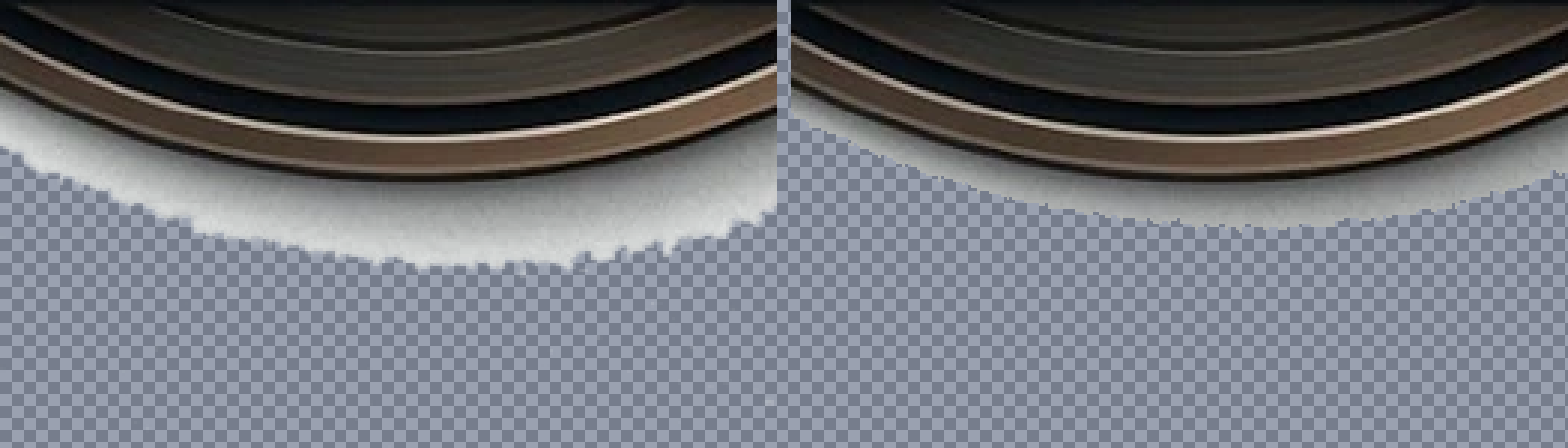 The white skirt was opaque, not alpha
Files
| File | Size | What it is for |
|---|---|---|
| emblem-clean.png | 689×704 · 854 KB | Full-resolution RGBA, trimmed to the artwork. Edit this one. |
| emblem-square.png | 704×704 · 854 KB | Same artwork centred on a square canvas. |
| emblem-clean.webp | 512×512 · 82 KB | Site asset. Replaces dist/emblem.webp. |
| favicon-180.png | 180×180 · 80 KB | Favicon. Replaces logo.jpg, which is a JPEG with a white square behind it. |
| emblem-original.webp | 780×805 · 142 KB | The original, kept for comparison. |



What was changed
- David re-cut the outer rim by hand, removing 13,664 pixels of leftover halo that the automated pass had kept — a uniform 2-4px bright ring hugging the whole badge, which was opaque rather than semi-transparent and so invisible to an alpha-based cleanup. His edge is also softer (2,942 partial-alpha pixels against 1,315), which holds up better when the mark is scaled down. This file is his, with 19 stray eraser crumbs dropped and the canvas re-trimmed.
- The white skirt is gone. This was the real problem, and it was not an alpha problem at all — the drop shadow had been baked in as fully opaque near-white pixels. Invisible on a white page, a pale blob on a dark one, and invisible to any amount of alpha cleanup. Removed by flooding in from the edges of the canvas through bright, desaturated pixels, which climbs until it meets the dark saturated rim of the badge and stops there. The silver ring sits above that rim, so it survives.
- The white matte is gone. Edge pixels had been composited over white, so a 60%-alpha pixel next to
rgb(39,30,29)artwork was readingrgb(251,247,246). Recovered withfg = (c − 255(1−α)) / α. - Shadow spill cut below α=24, and the alpha ramp tightened from about three pixels to one.
- Render dust removed. The file carried disconnected fragments, some fully opaque, sitting up to 68px below the badge. Only the largest connected component is kept — a plain trim would have preserved them, which is why the canvas was 780×805 for 695×717 of artwork.
Still broken, and not fixable from this file: the badge is clipped at the top. 28 opaque pixels sit flat against the first row of the original, so the top of the ring was cropped before the file was ever saved. That data does not exist. Redraw that edge, or re-export from whatever produced it.
If you edit this by hand, do not use MS Paint. Paint has no alpha channel — it will fill every transparent pixel with white on save, which puts the skirt straight back and adds a white box around the whole badge. Use Photopea in the browser, or Paint.NET, or GIMP. Any of the three keeps the alpha.